

Get started
Connect a test product, review its actions, create a journey, and run your first assessment.
This guide takes a new workspace through one complete customer workflow. You need a product endpoint that Invokeable can reach and a nonproduction account that assessment runs may use.
Use a sandbox or staging environment
An assessment can create, update, send, or delete records when the journey requires it. Keep live customer data out of the connected test environment.
Before you begin
- Use an Admin account for initial setup.
- Prepare a GitHub repository, MCP endpoint, OpenAPI URL, or exported contract file.
- Know whether the target environment is a sandbox, staging system, or production system.
- Have any required token or API key available. Invokeable seals it in your browser before it is sent.
Create or open your workspace
Sign in and create a workspace if your organization does not have one. A workspace contains your product connections, agents, journeys, runs, findings, and members.
Connect your product
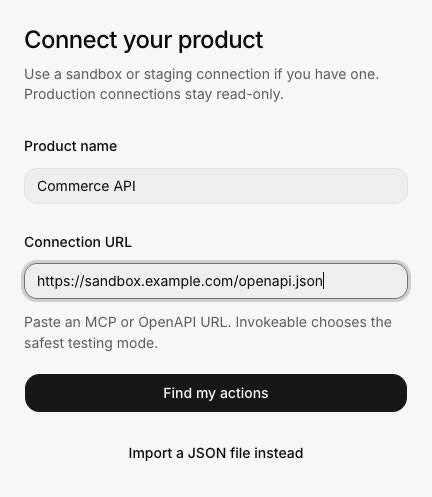
Open Catalog and choose Connect product. Connect the GitHub repository that contains invokeable.yaml, add an MCP or OpenAPI URL, or import a contract file.
Supply a credential if requested
Paste the token or API key into the secure credential step. The browser encrypts the credential for the active workspace, request, and connector before transmission. If a connection needs no credential, Invokeable skips this step.
Review the discovered actions
Check each action's purpose, access level, risk, confirmation requirement, retry behavior, and verification method. An action marked Needs setup cannot be used safely until its missing information is resolved.
Check connected agents
Open Agents. At least one agent must be active and compatible with the capabilities required by the journey. Open an agent to review limitations when its status needs attention.
Create a journey
Open Journeys, choose Create journey, and describe one customer task. Include the intended result and any behavior that must not happen.
A customer asks to change from the Starter plan to the Growth plan.
Confirm the new plan and billing date. Do not create a second subscription.
Review the test plan
Confirm the success conditions, protected behavior, failure response, and coverage. Edit anything that does not match the customer task before you run it.
Run the assessment
Select Run test, review the test count and safety limits, then select Start test. You can leave the page while Invokeable runs and verifies the assessment.
Review the result
Open Findings, then select Test results. The summary shows each check as passed, failed, or inconclusive. Use Activity when you need the sequence of actions and observations.
What completion means
A completed run is not automatically a successful run. Invokeable separates execution state from the verified outcome:
- Passed means the expected state and protected behavior were verified.
- Needs attention means one or more checks failed or a repeatable product problem was found.
- Couldn't complete means the assessment stopped, failed, or lacked enough evidence for a trustworthy decision.
The agent's final message is context. The verified product state decides the outcome.